Tag Archives: IT

Penguin Enrichment using tablets
An interesting use of technology in the enrichment program for their Magellanic penguins in the Aquarium of the Pacific in LA. Experimenting with many objects to engage the naturally curious birds, aviculturist Sara Mandel found that the penguins took quite a liking to an iPad game she got for her cats. To Mandel’s surprise, the little birds became obsessed and playing with the tablet is now a part of their daily enrichment routine—something that ultimately benefits the cute critters’ mental and physical well-being.
Five Computer Security Myths, Debunked By Experts

Some computer security myths and stories that keep getting passed around, even though they’re clearly not true. We sat down with computer security experts to separate fact from fiction.
Title image made using Maksim Kabakou (Shutterstock) and iadams (Shutterstock). Additional photos by Alexandre Dulaunoy, snurre86, woodleywonderworks, and Håkan Dahlström
We know there are still some computer security stories that everyday users continue to believe, even though they have either been long debunked, or because they keep getting spread around.
We sat down with computer security and forensics experts Frederick Lane and Peter Theobald to get to the truth behind some security myths we’ve all encountered on a regular basis.
Myth #1: No One Would Want To Hack Me, I Don’t Have Anything Worth Taking
Enable Copy-Paste in Web Pages That Disallow It with a Firefox Tweak
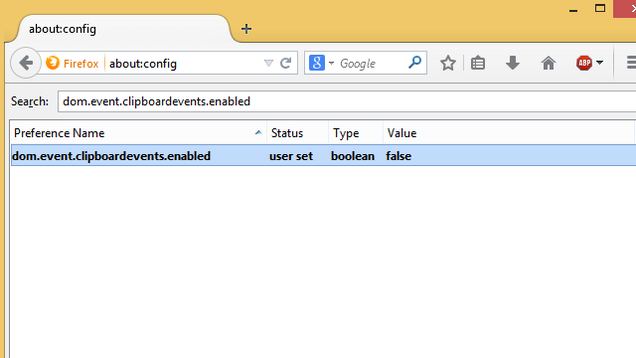
Firefox: Some web sites don’t let users copy text or paste their own, like PayPal which won’t let you paste a password. This Firefox settings tweak gives you copy-paste functionality when sites try to take it away.
In PayPal’s case, they block pasting passwords as a security measure. But if you want to bypass that or simply copy-paste text from any site which doesn’t allow it, WonderHowTo tells us how:
- Go to about:config
- Search for dom.event.clipboardevents.enabled
- Double-click it to change the value to “false”
Restart your browser and you’re done! Of course, when it comes to passwords, you are better off using a password generator and manager like Lastpass. But this is still a neat trick for many web sites which don’t allow you to copy their text.